
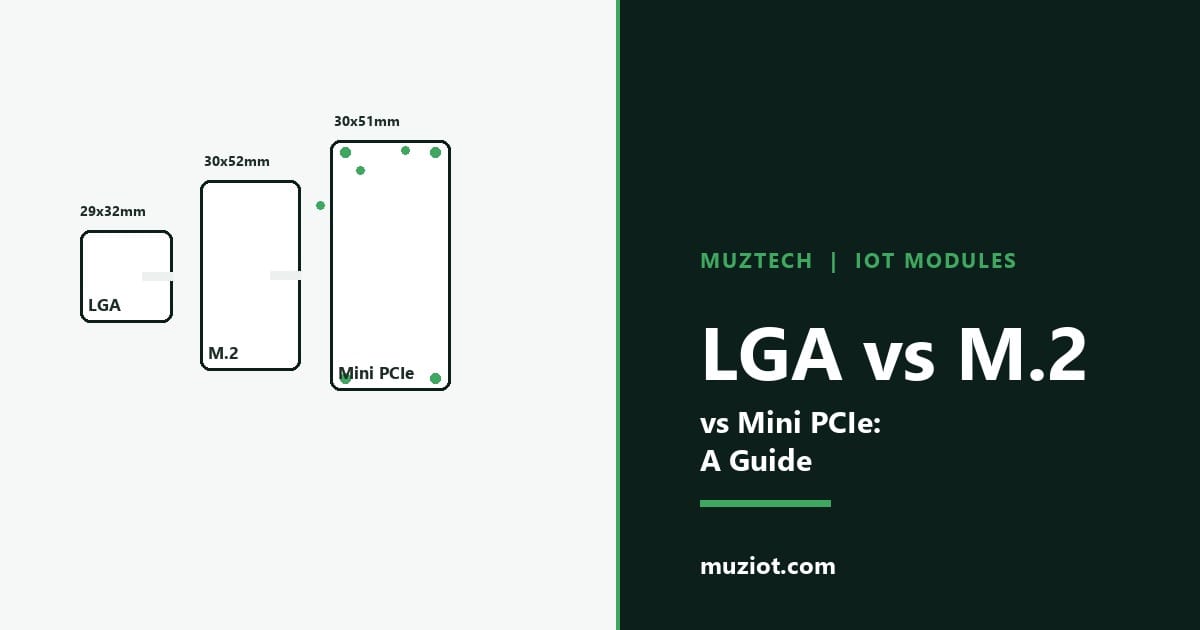
Cellular Module Form Factor Guide: LGA vs M.2 vs Mini PCIe
Before you pick a chipset, pick a shape. The form factor is the decision that decides how the module gets mounted, how the board is laid out, how it stays cool, and whether a technician can swap it in the field. Two modules can run the same modem and still be a different product because one is soldered and one is a card.
There are three that matter: LGA, M.2, and Mini PCIe.
The three forms
LGA (land grid array) is soldered flat to the board. It is small, low-profile, and the PCB itself becomes the heatsink, so it handles heat well. Because it is soldered, it is durable against vibration and it costs the least at volume, but you need a reflow line and you cannot swap it later. The Quectel EG25-G is an LGA Cat 4 module at 29 x 32 x 2.4 mm, and the EG95-E and EC25 families sit in the same camp.
For an M.2 cellular module, verify the exact card dimensions, keying, host interfaces, power supply, antenna connectors and driver support. A matching socket or similar card size does not by itself establish electrical or software compatibility. The EM05 is an M.2 Cat 4 card. The tradeoff is the socket plus a metal shield and heatsink for the hotter 5G cards, and the small connectors demand precise antenna routing.
Mini PCIe is a socketed card format used in some cellular devices. Check the exact card dimensions, mounting points, supported host interfaces and antenna connector part numbers. A Mini PCIe-shaped cellular card does not by itself confirm support for PCIe data communication or a particular RF connector.
How the choice changes the design
With LGA you own the board. The RF routing, the shield, the antenna, and the thermal path are all yours, and the module becomes part of the product. That is why it is cheap at volume and why changing supplier means a new board. If the device is sealed and small, that is the point.
With M.2 the module is a line item you can swap. That is great for prototypes, gateways, industrial PCs, and anything that might take a faster module later. You pay for the socket, a heatsink for the hotter cards, and a bit more board area. Select the antenna cable against the connector part number and mating instructions in the module documentation, including the required clearance and cable routing.
With Mini PCIe you get a rugged, serviceable card in a known shape. If you are refreshing a deployed fleet or supporting existing gateways, it is the low-risk path. For a brand-new compact product it costs more area and height than the alternatives.
Matching the form factor to the product
- Sealed, small, high-volume (meter, tracker, hotspot): LGA. Smallest, cheapest, soldered for durability.
- Gateway, router, industrial PC, dev kit: M.2, so the radio is a field-swappable line item.
- A product that may take a 5G module later: evaluate an M.2 option only after checking the candidate card, host interfaces, power, antennas, thermal design and drivers.
- Very-high-vibration or an existing fleet: Mini PCIe, for the screwed, rugged mounting, or a well-mountained LGA.
The checklist before you commit
- Decide prototype versus production. Prototype on M.2 or Mini PCIe, then move to LGA for cost and size at volume. Confirm the same chipset is actually offered in both forms before you plan around it.
- Thermal budget. A 5G card needs a heatsink or a copper thermal path. LGA conducts into the board; an M.2 card relies on its shield and a thermal pad.
- Count the radio ports. Check the required antenna ports and MIMO configuration in the module hardware guide. Match the pigtail to the connector specified for the exact module part number.
- Mechanical keying and mounting. M.2 B-key and E-key are different slots. Mini PCIe uses screws; M.2 uses a standoff. Check enclosure clearance.
- Serviceability. If you will swap modules in the field, a socketed form wins, and keep spare cards and matching antenna pigtails.
Where each form is the wrong pick
Do not reach for M.2 just because it is newer. In a sealed device you will never open, the socket and heatsink are pure cost, and you still solder everything else. Do not pick Mini PCIe for a brand-new compact product unless you need the rugged mounting or you are carrying a legacy design. And do not pick LGA when you know you will iterate on the module, because changing it means a new board.
The short version
The form factor is a product decision, not a module specification. Choose by how the device is built, mounted, serviced, and how long it has to live. Prototype fast and upgrade later: M.2. Smallest and cheapest sealed build: LGA. Refreshing a deployed fleet: Mini PCIe. Get that right and the rest of the module choice gets easy.
We carry cellular modules in LGA, M.2 and Mini PCIe forms, plus the antennas and pigtails to match. Tell us the enclosure, the MIMO count and whether the module will be swapped in the field, and we will point you to the right part.
Send us your BOM choosing the right cellular module
Sources
- Soracom, “Choosing the right cellular module for your IoT deployment” (https://soracom.io/choosing-the-right-cellular-module-for-your-iot-deployment/)
- Quectel, “LTE EG25-G” (https://www.quectel.com/product/lte-eg25-g/)
- Techship, “SIMCom SIM8260G-M2 5G Sub-6 module – M.2 3052” (https://techship.com/product/simcom-sim8260g-m2-5g-sub6/)
- Fibocom, “FM150 module – Type 3052-S3-B interface” (https://www.manualslib.com/manual/2069171/Fibocom-Fm150-Na.html)
- Maxon, “M.2 WiFi module vs Mini PCIe: an industrial integration guide” (https://www.mxcomm.cn/support/technical-share/3994.html)
- Cavli Wireless, “Choosing between M.2 and mPCIe modules for industrial IoT” (https://www.cavliwireless.com/blog/product-feature/m2-vs-mpcie-industrial-iot-form-factor)
- Cervoz, “Mini PCIe vs M.2” (https://www.cervoz.com/company/news/mPCIe-vs-M2/detail)