
A cellular modem can appear in lsusb and create a network interface while the application still has no connection. USB enumeration, modem control and host IP configuration are separate steps. Choosing QMI, MBIM or ECM changes how those steps fit together.
Start with a mode your modem firmware and Linux stack support. Then work through session activation, host IP setup and recovery after a dropped connection. This gives you a practical way to choose an interface and find where a connection fails.
1. Separate the control path from the data path
The control path carries requests and status: SIM readiness, registration, APN selection, session activation and connection settings. The data path carries the application's network traffic. Both must work.
QMI is a Qualcomm-origin modem management protocol. MBIM, the Mobile Broadband Interface Model, is a USB-IF specification covering modem control and data transport. ECM, the Ethernet Control Model, provides an Ethernet-style USB data interface. With ECM, cellular session control comes from the device's AT/vendor interface or its firmware's automatic connection behavior.
On USB devices, QMI and MBIM commonly expose a control node such as /dev/cdc-wdm0 alongside a network interface such as wwan0. Identify the protocol from the bound driver and the modem manager's port information. The examples below use USB; the ModemManager device-type guide also covers the different control ports used by PCIe devices and integrated modem SoCs.
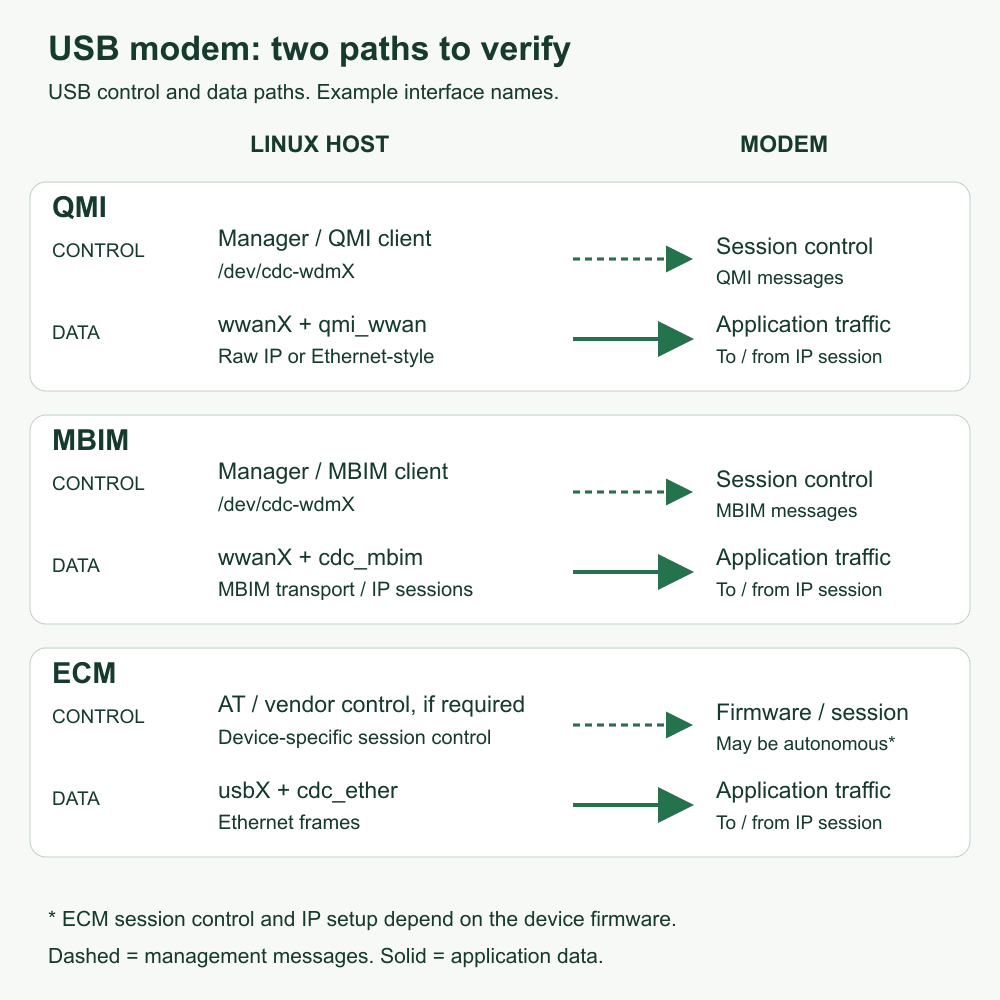
USB control and data paths, with example interface names. Open the diagram at full size to inspect the labels.
For an M.2 design, check the card and host's USB wiring alongside the software mode. The LGA, M.2 and Mini PCIe guide covers the socket and board checks.
2. Compare the Linux integration work
On small screens, scroll the table sideways.
| Question | QMI over USB | MBIM over USB | ECM over USB |
|---|---|---|---|
| Common upstream network driver | qmi_wwan | cdc_mbim | cdc_ether |
| Cellular session control | QMI-aware software, often ModemManager with libqmi | MBIM-aware software, often ModemManager with libmbim | Device-specific AT/vendor control or automatic connection in firmware |
| Typical host-facing data format | Raw IP or Ethernet-style framing, depending on device and configuration | MBIM data transport carrying IP sessions | Ethernet frames |
| Host IP setup | Apply the bearer settings using the reported addressing method | Apply the bearer settings using the reported addressing method | Use the firmware's addressing method, such as DHCP |
| First integration check | Driver binding, control/data pairing and framing agreement | Driver binding and a working userspace MBIM manager | How the cellular session is activated and whether IP settings reach the host |
The driver handles the USB data path; connection software handles cellular setup. Linux's QMI driver at v6.6 includes raw-IP and Ethernet-style handling, while the ECM driver at that tag handles USB Ethernet. Match the driver, USB composition and data format to your device.
For MBIM, cdc_mbim exposes the control channel to a userspace application. Use an MBIM-aware manager to establish the session, as described in the Linux v6.6 MBIM documentation.
Choose the integration your team can maintain. When comparing throughput, use the same host, modem firmware, USB link speed, network conditions and application workload.
3. Identify your modem and Linux host
Capture the running kernel, distribution, USB tree and network interfaces. With ModemManager installed, the last two commands also record its version and detected modems:
uname -r
cat /etc/os-release
lsusb
lsusb -t
ip -br link
mmcli --version
mmcli -L
If ModemManager is installed and running, select the modem reported by mmcli -L. Replace the angle-bracket placeholder before running the next command:
mmcli -m <modem-index-or-path>
The mmcli manual documents modem discovery and selection. Read the reported manufacturer, model, firmware revision and ports. Record the full ordering part number separately from the label or purchasing record; a generic model string may omit a regional suffix.
Match the USB device, its network interface and its control port to the same physical modem. With two modems attached, assuming that cdc-wdm0 belongs to wwan0 can send control requests to one device while configuring another. USB interface details and sysfs parent paths help establish the pairing.
On small screens, scroll the table sideways.
| Record | What to retain |
|---|---|
| Module and board | Full part number, regional suffix, firmware revision, hardware/carrier-board revision |
| Host | Distribution and release, exact running kernel, CPU architecture, USB connection and observed link speed |
| Driver | Bound driver, built-in or module status, relevant kernel configuration and any vendor patch/package revision |
| Userspace | ModemManager, NetworkManager or alternative connection manager, plus versions and selected modem ports |
| Network | Destination country/operator, SIM profile, APN, authentication requirement and requested IP family |
| Result | Timestamped enumeration, registration, bearer, addressing, routing and application evidence |
Record the actual kernel build and enabled drivers. Distribution backports, kernel configuration and vendor patches help explain why two hosts running similar releases can behave differently.
4. Select the USB mode for your Quectel module
Use the USB driver guide, AT manual and firmware notes for your module to select its USB mode. For commands such as AT+QCFG="usbnet", check the supported values, selected interface layout and restart procedure.
Quectel's WCDMA & LTE Linux USB Driver User Guide V1.9 describes an ECM implementation that establishes the data call internally and supplies host settings through DHCP. Section 5.5 applies to the older module families listed in that guide. For the RM520N-GL M.2 module, use its matching USB/AT documents to confirm the modes available in the supplied firmware.
A mode change can alter the ports Linux sees and require reconnecting the modem. Save the current composition and the documented restore procedure before changing it.
5. Give connection management a single owner
On a system using NetworkManager and ModemManager, ModemManager handles modem signaling. NetworkManager uses the resulting connection information to configure host networking. The ModemManager IP-connectivity guide explains this division and the addressing methods a bearer can report.
If NetworkManager is present, these commands show its version, devices and active connections:
nmcli --version
nmcli device status
nmcli connection show --active
The NetworkManager nmcli reference covers these status commands. On OpenWrt or a custom embedded image, record the network manager already used by the system.
Keep one owner for starting and stopping the session during debugging. If you switch to a vendor utility or a direct QMI/MBIM tool, hand control over deliberately and restore the original manager afterward.
Once a bearer exists, compare its IP settings with the host's addresses and routes. Select the bearer path or index shown for the modem:
mmcli -b <bearer-index-or-path>
ip -br address
ip route show
ip -6 route show
Follow the bearer addressing method: apply the supplied settings for static configuration, or check DHCP/IPv6 SLAAC when requested. For QMI, confirm that host and modem use the same data framing before troubleshooting addresses and routes.
6. Find where the connection fails
Work from USB detection to the application's request. Save each result from the same connection session so you can identify the first failing step.
On small screens, scroll the table sideways.
| Observation | Check next | Evidence to save |
|---|---|---|
| Modem absent from the USB tree | Power, cable, host wiring and expected USB composition | Host kernel log and USB enumeration, with timestamps |
| USB device present, expected ports absent | Composition, bound driver, kernel configuration and device-ID support | USB tree, interface descriptors and driver/package revision |
| Ports present, manager finds no modem | Supported device/plugin, port grouping and management ownership | Manager version, discovery result and relevant service log |
| Modem found, no usable cellular session | SIM readiness, registration, APN, IP-family support and rejection cause | Modem status and session attempt result, with identifiers redacted |
| Bearer connected, host has no usable address or route | Reported addressing method, network-manager configuration and QMI framing where applicable | Bearer settings, host addresses and IPv4/IPv6 routes |
| Application still fails | Selected route/interface, DNS, firewall/VPN policy and remote endpoint | Name-resolution result and a timestamped application request on the intended path |
Check that the application request uses the modem's interface and route, especially when Ethernet or Wi-Fi is also connected. Some endpoints filter ICMP, so test with an application request to a controlled endpoint as well as ping.
In an ECM setup, DHCP configures the local host link. Check operator registration and external reachability next. Review the device's gateway behavior and the operator's service when the application needs inbound access or IPv6.
7. Choose a mode for your product
Choose QMI when your Linux stack supports the modem and your team needs its control and diagnostic features. Check framing and reconnect behavior during qualification.
Choose MBIM for a device and host stack that support its standardized management interface. Check any additional services your product needs in the libmbim protocol guide and the modem's firmware documentation.
Choose ECM when the modem's Ethernet-style interface and session behavior fit your host design. Confirm APN selection, registration status, recovery after a dropped session and the required IP family.
For each candidate mode, keep the host and module details, driver and ports, addressing method, application result and reconnect procedure in one qualification record. This makes a working setup easier to reproduce when the board or software changes.
Include these host requirements alongside the bands, power and mechanical checks in the cellular module selection guide. Use the datasheet center to request applicable documentation. For a BOM inquiry, send the module candidate, Linux release, interface requirement and quantity.